Tools
Plugin Multimodal Embeddings
 By
OpenClaw memory embedding provider for OpenAI-compatible endpoints, with local image and audio indexing (e.g. EmbeddingGemma 2 on llama.cpp)
Install
openclaw plugins install /path/to/multimodal-embeddingsREADME
# Multimodal Embeddings (OpenAI-compatible)
An OpenClaw plugin that registers a memory embedding provider named `multimodal-embeddings`. It sends text, and optionally images and audio, to any server that exposes an OpenAI-compatible `/v1/embeddings` endpoint. It also adds an agent tool, `multimodal_media_search`, that finds photos and recordings by describing them.
## Why
OpenClaw's built-in multimodal memory indexing only works with Gemini. This plugin lets you index images and audio with a model you run yourself, so the files never leave your machine. It also works as a plain text embedding provider for any OpenAI-compatible server, and it adds the task prefixes that EmbeddingGemma needs.
## Demo
An agent asked for "the pictures of the eggs benedict breakfast" calls `multimodal_media_search`, which ranks the photos already indexed in its memory, and attaches the best matches. The photos have meaningless names (`input-a6f0a32c-….jpg`), so the match comes from the content. Click the image to play the 48-second recording.
[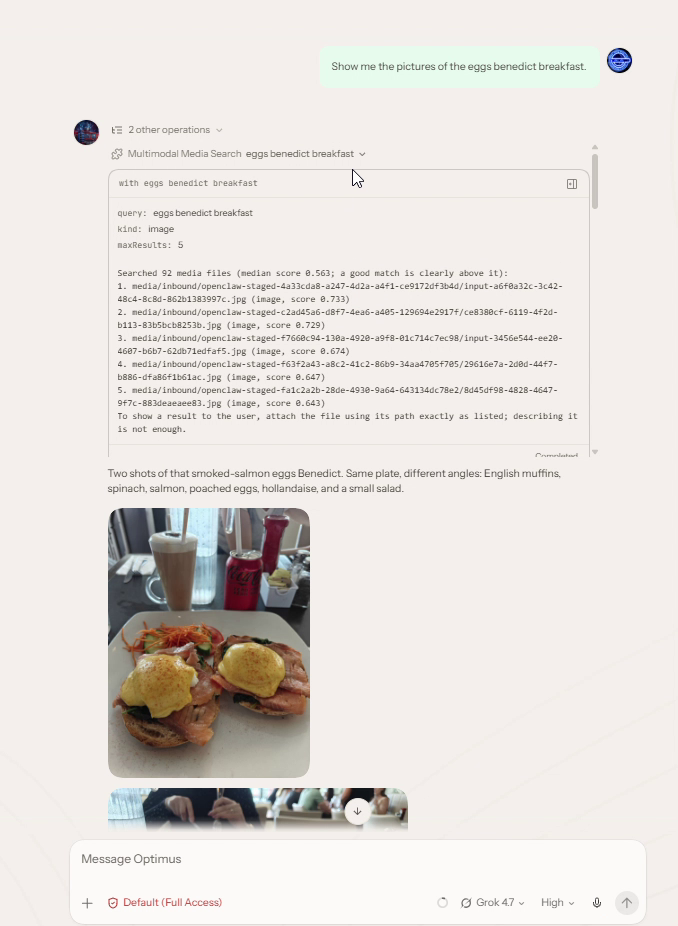](https://github.com/guarismo/openclaw-plugin-multimodal-embeddings/blob/main/docs/media/media-search-demo.mp4)
## Requirements
- OpenClaw 2026.9.8 or newer.
- A server that exposes an OpenAI-compatible `/v1/embeddings` endpoint.
- For images and audio: a multimodal embedding model. The tested setup is llama.cpp `llama-server` started with `--embeddings` and `--mmproj`, serving `ggml-org/embeddinggemma-2-GGUF`.
- `ffmpeg`, only if you want media converted automatically (on by default). See "Supported files".
## Install
From a local path:
```bash
openclaw plugins install /path/to/multimodal-embeddings
```
A ClawHub install (`clawhub:openclaw-plugin-multimodal-embeddings`) will be available later.
The plugin is loaded from `dist/`, so run `npm run build` in the plugin directory first if you install from source.
## Configuration
Example (JSON5):
```json5
{
memory: {
search: {
provider: "multimodal-embeddings",
model: "embeddinggemma-2",
remote: {
baseUrl: "http://127.0.0.1:8080/v1",
apiKey: "none",
},
multimodal: {
enabled: true,
modalities: ["image", "audio"],
},
// Media is only indexed from extra paths.
extraPaths: ["~/Pictures/notes", "~/Recordings"],
},
},
plugins: {
entries: {
"multimodal-embeddings": {
config: {
convertMedia: true,
ffmpegPath: "ffmpeg",
batchSize: 32,
models: {
// Key = the model id sent to the server (memory.search.model).
"embeddinggemma-2": {
modalities: ["image", "audio"],
mediaLabel: "include",
dimensions: 768,
},
},
},
},
},
},
}
```
`memory.search.model` must be set. If `remote.baseUrl` is omitted, the plugin uses `http://127.0.0.1:8080/v1`.
The plugin only reports multimodal support for a model whose entry lists `modalities`. Without that, `memory.search.multimodal` is rejected for the model. A model with no entry is treated as text-only.
### Plugin options
Set these under `plugins.entries["multimodal-embeddings"].config`.
| Option | Type | Default | Description |
| --- | --- | --- | --- |
| `models` | object | none | Per-model settings, keyed by the model id sent to the server. Use `"*"` as a fallback for models without their own entry. An exact entry is not merged with `"*"`. |
| `models.<id>.modalities` | array of `"image"`, `"audio"` | `[]` | Media this model can embed in the same space as text. Omit for a text-only model. |
| `models.<id>.mediaFormat` | `"content-parts"` \| `"chat-messages"` | `"content-parts"` | Request shape for media. `content-parts`: llama.cpp / OpenRouter `{content:[...]}` objects in a batched `input` array. `chat-messages`: vLLM, one `{messages:[{role:"user",content:[...]}]}` request per media input; text stays batched. |
| `models.<id>.preset` | `"none"`, `"embeddinggemma"` | `embeddinggemma` if the model id contains "embeddinggemma" (any case), else `none` | Built-in prompt prefixes. |
| `models.<id>.queryPrefix` | string | from preset | Overrides the preset's query prefix. |
| `models.<id>.documentPrefix` | string | from preset | Overrides the preset's document prefix. |
| `models.<id>.mediaLabel` | `"include"`, `"omit"` | `"include"` | Whether to send memory's "Image file: <path>" label along with the media. |
| `models.<id>.dimensions` | integer >= 1 | unset | Expected vector size. Vectors of any other size cause an error. |
| `convertMedia` | boolean | `true` | Convert media the server cannot decode with ffmpeg before sending. |
| `ffmpegPath` | string | `"ffmpeg"` | Path to the ffmpeg binary. |
| `batchSize` | integer 1-256 | `32` | Inputs per request. Values above 256 are clamped to 256. |
The EmbeddingGemma preset uses `task: search result | query: ` for queries and `title: none | text: ` for documents.
## Finding media: `multimodal_media_search`
Use this tool, not `memory_search`, to find photos and recordings.
`memory_search` ranks media and text together, and in a real memory the media rarely surfaces. Three things work against it, and none of them can be configured: text-to-text similarity runs higher than text-to-image or text-to-audio similarity with the same model; memory-core applies a 30-day recency decay to files in `extraPaths`; and a media file has no keyword text, so it gets none of the 30% keyword share of the score. With a few months of food photos in an agent's memory, notes about food outrank every photo.
`multimodal_media_search` searches only the image and audio vectors that memory already stored for the calling agent, so none of that applies. It does not embed media again; it embeds the query the same way memory does and compares it with the stored vectors, which takes tens of milliseconds.
Parameters:
| Parameter | Type | Default | Description |
| --- | --- | --- | --- |
| `query` | string | required | What the photo shows or the recording says. `description` is accepted as an alias. |
| `kind` | `image` \| `audio` \| `any` | `any` | Limit the search to one kind. |
| `maxResults` | integer 1-10 | `3` | Number of results. |
It returns workspace paths with scores, plus the median score of everything searched. Scores are relative: a good match is clearly above the median (for EmbeddingGemma 2, typically 0.1 or more).
The tool only works for agents whose `memory.search.provider` is `multimodal-embeddings`. Agents with a tool allow list need `multimodal_media_search` added to it (and to `tools.sandbox.tools.alsoAllow` for sandboxed agents). OpenClaw asks for capability consent the first time the plugin registers a tool: `openclaw plugins enable multimodal-embeddings --accept-capabilities`.
Small models pick the right tool more reliably with a line in the agent's `AGENTS.md`, for example:
```markdown
When asked to find a photo, picture, screenshot, voice note or audio clip, call `multimodal_media_search`
with a description of its content, then send the best match as an attachment using its `path` exactly as given.
```
## Tested models
Tested with seven embedding models on llama.cpp's `llama-server` (build b11457, OpenAI-compatible `/v1/embeddings`), Q8_0 GGUFs on a 6 GB RTX 3050, through the plugin's provider. The test set is small (8 notes with paraphrased questions, 9 images, 8 voice notes); it shows that each model works with the plugin, not how well it ranks a large library.
| Model (GGUF) | Text | Images | Audio | Plugin settings (`models.<id>`) | Server settings |
| --- | --- | --- | --- | --- | --- |
| EmbeddingGemma 2 (`ggml-org/embeddinggemma-2-GGUF` + mmproj) | 8/8 | 9/9 | 8/8 | `modalities: ["image","audio"]`; prefixes are built in | `--ubatch-size` ≥ input length (non-causal); ctx = batch = ubatch |
| Qwen3-VL-Embedding-2B (`mradermacher/Qwen3-VL-Embedding-2B-GGUF` + mmproj) | 8/8 | 9/9 | – | `modalities: ["image"]`, `preset: "none"`, optional `queryPrefix: "Instruct: Retrieve images or text relevant to the user's query.\nQuery: "` | `--pooling last`; ctx 2048, ubatch 1024 to fit 6 GB |
| GME Qwen2-VL-2B (`mradermacher/gme-Qwen2-VL-2B-Instruct-GGUF` + mmproj) | 8/8 | 8/9 | – | `modalities: ["image"]`, `preset: "none"`, `queryPrefix: "Instruct: Find an image that matches the given text.\nQuery: "` | `--pooling last` (the GGUF declares none, which the OpenAI endpoint rejects); ctx 2048, ubatch 1024 |
| jina-embeddings-v4, retrieval (`jinaai/jina-embeddings-v4-text-retrieval-GGUF` + mmproj) | 8/8 | 9/9 | – | `modalities: ["image"]`, `preset: "none"`, `queryPrefix: "Query: "`, `documentPrefix: "Passage: "` | `--pooling mean`; on 6 GB: ubatch 512 and `--image-max-tokens 512`, otherwise image encoding runs out of memory |
| Qwen3-Embedding-0.6B (`Qwen/Qwen3-Embedding-0.6B-GGUF`) | 8/8 | – | – | `preset: "none"`, `queryPrefix: "Instruct: Given a web search query, retrieve relevant passages that answer the query\nQuery:"`, `documentPrefix: ""` | – |
| nomic-embed-text-v1.5 (`nomic-ai/nomic-embed-text-v1.5-GGUF`) | 7/8 | – | – | `preset: "none"`, `queryPrefix: "search_query: "`, `documentPrefix: "search_document: "` | ctx 2048 (trained length) |
| bge-m3 (`gpustack/bge-m3-GGUF`) | 8/8 | – | – | `preset: "none"` | – |
Notes:
- Models without audio support reject audio inputs with a clear server error; mixed text-and-image batches worked with every multimodal model.
- Qwen3-VL-Embedding separated images most clearly (the right image led the best wrong one by at least 0.21 cosine, against 0.08 for EmbeddingGemma 2 and 0.005 for jina-embeddings-v4). EmbeddingGemma 2 is the only one tested that embeds audio.
- Qwen3-VL-Embedding and GME document their instruction
... (truncated)
tools



Comments
Sign in to leave a comment