Tools
Media Storage
 By
By Openclaw plugin to pull media storage information from Sonarr and Radarr
Install
npm install
npm
README
# Media Storage
A read-only [OpenClaw](https://docs.openclaw.ai) feature plugin that adds a native **Media Storage** page to the
Control UI, showing how much storage your Sonarr and Radarr libraries use, down to individual files.
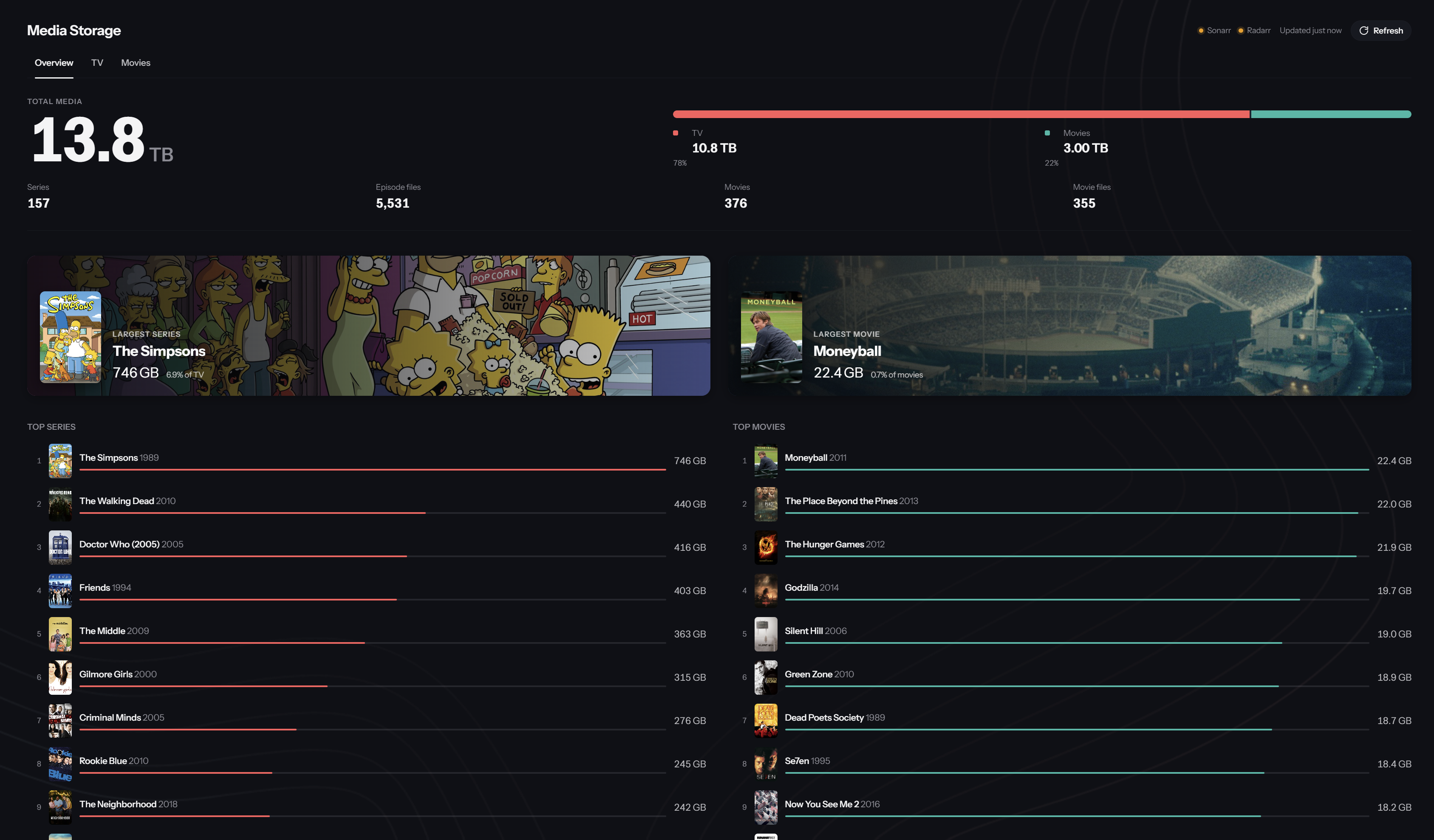
- **Overview:** total, TV and movie storage, file counts, the largest series and movie, and the top consumers.
- **TV:** poster grid with search and sorting, then series → seasons (including Specials) → individual files.
- **Movies:** poster grid with search and sorting, then a detail view explaining each file's size.
- Live data from the Sonarr/Radarr APIs; nothing is written to either service.
Built and tested against OpenClaw 2026.9.7.
## Requirements
- OpenClaw ≥ 2026.9.7 with **Settings → Labs → Custom plugin UI** enabled
(`gateway.controlUi.experimental.customPlugins: true`).
- The Control UI opened over HTTPS or a loopback address (native plugin UI can't load over plain HTTP on a LAN address).
- Sonarr v4 and/or Radarr (API v3) reachable from the Gateway.
## Install
From git:
```sh
openclaw plugins install git:github.com/ffalor/media-storage@main --accept-capabilities --force
openclaw plugins enable media-storage --accept-capabilities
```
Pin a tag or commit instead of `main` for a fixed version. Then configure the URLs and API keys below.
### From a local archive
```sh
npm install
npm run build
npx openclaw plugins pack --root . --out ./media-storage.tgz --json
openclaw plugins install ./media-storage.tgz --accept-capabilities --force
openclaw plugins enable media-storage --accept-capabilities
```
The archive is self-contained (bundled backend and compiled UI), so it can be copied to the Gateway host and
installed there.
## Configuration
Config lives under `plugins.entries.media-storage.config`.
| Key | Default | Notes |
| --- | --- | --- |
| `sonarr.url` | `http://localhost:8989/` | Sonarr base URL |
| `sonarr.apiKey` | secret `SONARR_API_KEY` | SecretRef (see below) |
| `radarr.url` | `http://localhost:7878/` | Radarr base URL |
| `radarr.apiKey` | secret `RADARR_API_KEY` | SecretRef (see below) |
The API keys are SecretRefs (`configContracts.secretInputs`): config holds only a reference, Settings redacts it,
and the plugin reads the resolved key per request without keeping it.
1. In Settings → Secrets, add **protected** entries named `SONARR_API_KEY` and `RADARR_API_KEY` (no allowed
hosts needed). Find each key in Sonarr/Radarr under Settings → General → Security.
2. Set the URLs in the plugin's settings, or:
```sh
openclaw config set plugins.entries.media-storage.config.sonarr.url http://sonarr.local:8989/
openclaw config set plugins.entries.media-storage.config.radarr.url http://radarr.local:7878/
```
On first start the plugin writes the default references (`SONARR_API_KEY` / `RADARR_API_KEY`) into its config,
so nothing else is needed. To use differently named secrets, change the `id` in the plugin's settings, or:
```sh
openclaw config set plugins.entries.media-storage.config.sonarr.apiKey --ref-source store --ref-provider default --ref-id MY_SONARR_KEY
```
Config changes hot-reload the plugin and re-resolve its secrets. If you add or change a secret's value without
changing config, apply it with `openclaw secrets reload`.
## How data is refreshed
The plugin keeps one snapshot of each library in memory and never polls in the background.
- **Gateway start:** the plugin pulls both libraries straight away, so the page opens with data ready.
- **Opening the page:** you get the current snapshot instantly.
- Under 10 minutes old: no requests go to Sonarr or Radarr.
- Over 10 minutes old: you still see it immediately, while the backend rescans. When the rescan finishes,
the backend emits a `library-updated` event and the page updates itself.
- **Refresh button:** discards every cache and pulls everything live from Sonarr and Radarr.
- **"Updated N min ago"** in the header shows the age of the library data, not when you opened the page.
Series, season and movie detail views load on demand and are cached for 5 minutes. Artwork is cached for 7 days
in the browser and in a 64 MB backend cache; when Sonarr/Radarr update an image, its URL changes.
A full rescan reads the series list plus one episode-file list per series (6 requests at a time), and the movie
list in one request. On a library of ~150 series and ~380 movies it takes about 3–8 seconds.
## How storage is counted
- **Unique files:** storage is counted per unique media file, then rolled up file → season → series → TV total,
and movie file → movies total. A single file holding several episodes is counted once.
- **File counts:** come from Sonarr's `/episodefile` list, not its `statistics.episodeFileCount`, which counts
episodes and so over-counts multi-episode files.
- **Logical sizes:** every value is the exact byte size Sonarr/Radarr report for the file. Formatting to GB/TB
(decimal units) happens only in the UI; hover a size to see the exact bytes. These are logical file sizes, not
physical disk usage (hardlinks, compression and filesystem behaviour can make those differ).
- **Corrupt records:** if Sonarr fails to return a series' file list because one stored record is corrupt, the
plugin fetches the files one by one, derives the unreadable file's size from the season total, and marks it
"derived" in the UI.
## Security
- **Read-only:** every operation is a query requiring `operator.read`. Nothing modifies Sonarr, Radarr or files.
- **Keys stay server-side:** the browser talks only to the plugin's typed operations. API keys are used by the
Gateway backend and never appear in responses, logs, image URLs or the browser bundle.
- **Artwork:** served from `/media-storage/art/v1/<payload>.<signature>`. The HMAC signature means the browser can
only fetch images the backend handed out. The backend adds the API key upstream, and remote artwork is limited to
TVDB/TMDB/fanart.tv hosts.
## Development
```sh
npm install
npm run build # tsc + openclaw plugins build (emits dist/control-ui/<hash>/)
npm run validate
cp .env.example .env # fill in URLs and keys for the live tests
node test/backend.mjs # live backend checks: totals reconcile, no keys leak, artwork route
node test/refresh.mjs # startup warm-up and stale-while-revalidate behaviour
```
After backend changes, reinstall the archive (or run `openclaw plugins reload media-storage`). After browser-only
changes, use **Plugins → Advanced → Customize UI → Reload plugin UI** or reload the tab.
tools



Comments
Sign in to leave a comment